

Incoming calls
Review available recordings and supporting details for calls received by the connected phone.
FonSee can organize available incoming and outgoing call recordings from a supported, authorized phone. Dates, contact details, and playback controls help you understand what was captured before you decide whether a conversation is needed.
Call-recording laws vary. Provide notice and obtain every consent required where you live.


Review available recordings and supporting details for calls received by the connected phone.

Find available audio from calls placed on the phone, with useful date and contact context.

Open supported recordings from the FonSee dashboard and return to the details you need.
On supported phones, FonSee can make available call audio accessible through the dashboard. Recording coverage depends on the device, operating system, setup, permissions, connection, and applicable recording rules.
Audio without context can create confusion. FonSee pairs an available recording with details such as direction, time, and contact information so you can identify the relevant call. Listen for the specific issue that brought you to the dashboard instead of treating every conversation as something to review.
Use call recording only for a clear and lawful purpose. Tell the phone user what can be recorded and decide when listening is reasonable. Some states and countries require consent from every participant, while device platforms can also restrict or prevent recording.
The call recorder view keeps available audio beside the information that identifies it. This helps a parent choose the relevant recording, understand when it happened, and avoid listening without a clear reason.
Operating-system rules, phone hardware, app permissions, and connection methods can affect which calls have audio and how clearly they are captured.
A narrow purpose makes the feature easier to use responsibly. Agree on situations that may justify playback and situations that should remain private.

If a teen asks for help with a call, listen together when possible. Focus on the part they want help understanding and discuss the next step.
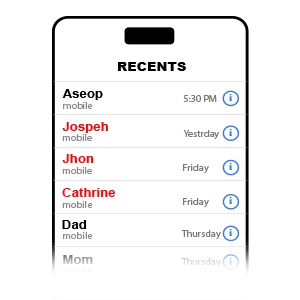
Use call details to identify the relevant contact and time before opening available audio. A direct question may provide the answer faster.

For an agreed family or business purpose, confirm that each participant has received the notice and consent required by applicable law.
Call recording is more restricted than a basic call log. Confirm both legal requirements and technical support for the exact device.
Check device compatibilityFind out whether one-party or all-party consent applies to the people and places involved. When in doubt, get clear permission from everyone.
Check the phone model, operating system, setup method, and call types supported by FonSee. Not every device or calling app can provide audio.
Follow the setup guide on the authorized phone, place a test call with consent, and confirm that the dashboard receives usable audio and details.
Recorded speech can include private information about more than one person. Limit access, keep the purpose specific, and remove recordings you no longer have a valid reason to retain.
Give notice and obtain the consent required for every caller and location connected to the recording.
Use the contact, direction, and time to find a relevant call. Avoid routine playback without a defined concern.
Keep dashboard access private, do not share recordings casually, and follow any retention duties that apply to you.
Parents should be able to identify the call they need, understand what the dashboard received, and stop when the question has been answered.
“The call list is easy to follow, and the time and contact details help me choose the right recording instead of searching through everything.”
Technical support and legal permission are separate questions. You need both before using a call recorder app.
FonSee can provide available audio for supported incoming and outgoing calls on compatible phones. Coverage varies by device, operating system, call type, permissions, and setup.
Recording law varies by country, state, and the location of each participant. Some places require consent from everyone. Get appropriate legal advice and every required consent before recording.
Options differ between Android and iPhone because each operating system limits recording in different ways. Check the exact device and connection method on the compatibility page before purchasing.
Available call audio can be organized for playback in the dashboard when the connected phone and chosen setup support recording. Call details help identify the relevant item.
The call type, phone hardware, microphone access, operating-system restrictions, internet connection, or setup can affect whether audio is captured and how it sounds.
Traditional phone calls and VoIP calls are different. Support for calls made through social or messaging apps varies, so review the separate VoIP and app-specific feature pages.
No. Retain only audio you have a lawful, specific reason to keep. Delete unneeded recordings according to your family agreement and any privacy or recordkeeping duties that apply.
Device behavior depends on the phone, operating system, and setup. Regardless of technical notices, you are responsible for telling users and callers and obtaining consent where required.
Confirm the phone, call types, consent rules, and FonSee plan before connecting a device.

